
Getting Started
What is Google Analytics?
Google Analytics is a free web analytics tool that helps website owners understand how visitors interact with their website. It provides valuable insights into user behavior, traffic sources, popular pages, and conversions. Whether you run a blog, an online store, or a business website, Google Analytics helps you make better decisions based on real data.
Why Should Beginners Learn Google Analytics?
If you own a website, knowing how visitors find and use your site is essential. Google Analytics allows you to:
- Track website visitors
- Monitor traffic sources
- Measure user engagement
- Find your best-performing pages
- Improve SEO performance
- Increase conversions
Without analytics, you're making decisions based on guesses instead of data.
Main Features of Google Analytics
1. Real-Time Reports
See how many users are currently on your website and which pages they are viewing.
2. Audience Insights
Learn about your visitors, including:
- Country
- City
- Device
- Browser
- Age (when available)
- Interests
3. Traffic Acquisition
Discover where your visitors come from.
Examples include:
- Google Search
- Social Media
- Direct Traffic
- Referral Websites
- Email Campaigns
4. Engagement Reports
Measure how users interact with your website.
Important metrics include:
- Page Views
- Average Engagement Time
- Events
- Scroll Tracking
- Session Duration
5 . Jargon Buster
Jargon Buster: A collection of easy-to-understand definitions for technical or industry-specific terms.
Simple Example
If your website is about Digital Marketing, your Jargon Buster could include:
- SEO (Search Engine Optimization): The process of improving a website so it appears higher in search engine results.
- PPC (Pay-Per-Click): An online advertising model where advertisers pay each time someone clicks their ad.
- CTR (Click-Through Rate): The percentage of people who click on an ad or link after seeing it.
- Impressions: The number of times an ad or webpage is shown to users.
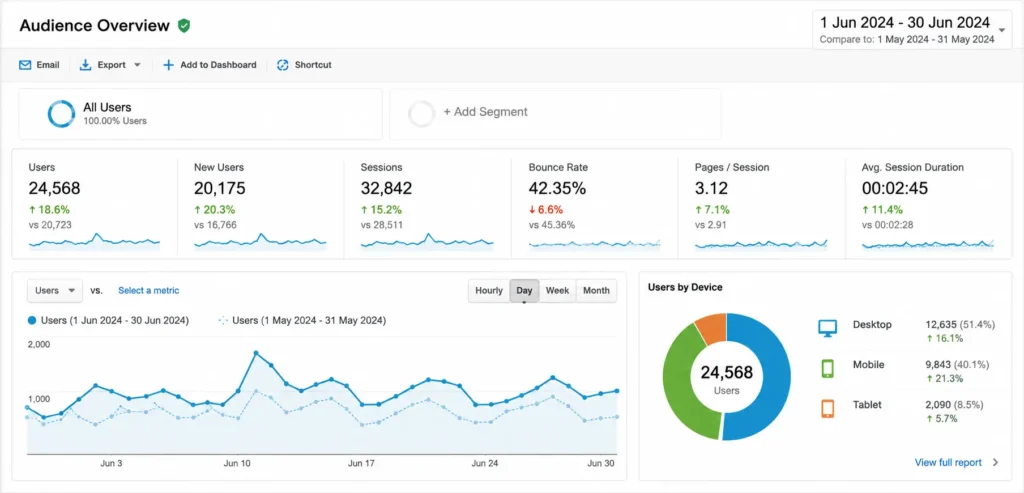
The graph is displayed on all of the main screens within Google Analytics, so it’s worth getting acquainted with it. By default, the graph shows “All Visits”. Each circle on the graph represents a day. Hover over a circle to see more information. In the top--right corner of the graph you’ll see a date range. Click the arrow on the right--hand side to expand the options. To change the date range, you can click on the calendar, or type in the date
What Are Metrics?
Metrics are numerical values used to measure the performance of your website, marketing campaigns, or business goals. In analytics tools like Google Analytics, metrics help you understand how users interact with your website.
Examples of common metrics include:
- Users
- Sessions
- Page Views
- Bounce Rate
- Average Engagement Time
- Conversions
What Does Removing Metrics Mean?
Removing metrics means deleting or hiding unnecessary measurements from your reports or dashboards. This helps you focus only on the data that is important for your business.
For example, if your report contains 20 metrics but you only need 8, you can remove the remaining metrics to make the report cleaner and easier to understand.Why Remove Metrics?
Removing unnecessary metrics offers several benefits:
- Makes reports easier to read.
- Reduces confusion for beginners.
- Highlights important business data.
- Speeds up report analysis.
- Improves decision-making.
What Is "Working with the Current Day"?
Working with the Current Day means analyzing your website's performance using today's real-time and daily data. It helps you monitor how visitors are interacting with your website on the current day, allowing you to make quick decisions and identify trends as they happen.
Why Is Working with the Current Day Important?
Monitoring the current day's data helps you:
- Track live website traffic.
- Measure campaign performance.
- Detect sudden traffic changes.
- Identify technical issues quickly.
- Improve marketing decisions in real time.
Key Metrics to Monitor
When working with the current day's data, focus on these important metrics:
- Active Users
- Sessions
- Page Views
- Engagement Rate
- Average Engagement Time
- Traffic Sources
- Conversions
- Events
What Does "Learn About Your Audience" Mean?
Learning about your audience means understanding who visits your website, what they are interested in, how they interact with your content, and what motivates them to take action. In digital marketing and Google Analytics, audience insights help you create better content, improve user experience, and increase conversions.
Lorem ipsum dolor sit amet, consectetur adipiscing elit. Ut elit tellus, luctus nec ullamcorper mattis, pulvinar dapibus leo.